Español
 Português (Brasil)
 Français
 Deutsch
 Italiano
 Nederlands
 Polski
 Svenska
 Türkçe
 Русский
 日本語
日本語 한국어
한국어 简体中文
简体中文 Tiếng Việt
 Bahasa Indonesia
 繁體中文
繁體中文 Čeština
 Dansk
Dansk Norsk (bokmål)
 Suomi
Suomi Ελληνικά
 Română
 Magyar
 Українська
 ไทย
ไทย हिन्दी
 العربية
 עברית
עבריתWhat Is Outbrain Amplify? The Self-Serve Platform Explained
Outbrain Amplify is the self-serve side of Outbrain's ad platform, where any advertiser can fund a budget and bid on native placements without a sales rep. Here is how it works end to end.


Outbrain Amplify is the self-serve half of Outbrain's advertising platform: the dashboard where any advertiser, from a two-person ecommerce store to an in-house media buying team, can open an account, fund a budget with a credit card, and start bidding to place native ad units across Outbrain's publisher network without ever talking to a sales rep. The other side of Outbrain, sometimes handled through managed service reps for larger brand budgets, exists too, but Amplify is the interface most independent media buyers, affiliates, and DTC advertisers actually log into.
Since Outbrain acquired Teads in a deal that closed in February 2025, the parent company renamed itself Teads Holding Co. and now trades on Nasdaq under the ticker TEAD. The performance side of the business is marketed as Outbrain Direct Response by Teads, but if you used to log into Amplify, you still log into the same self-serve platform. It just sits under a bigger corporate umbrella now. We cover the full timeline of that merger in Did Outbrain Become Teads?
How Amplify is structured#
Amplify organizes spend into three layers, the same hierarchy you would recognize from Google Ads or Meta, just with native-specific settings at each level.
- Campaign. Sets the marketing objective (traffic, conversions, app installs), the overall budget, and the conversion pixel that feeds the bidding algorithm.
- Content ad (the ad group equivalent). Holds your targeting: geo, device, OS, publisher and section inclusion or exclusion lists, and audience segments if you are retargeting.
- Creative. The actual headline-and-image pairs. Amplify lets you upload multiple images and multiple headlines per content ad, then rotates and tests them against each other inside the same targeting bucket.
That last layer is where most of the leverage lives. Outbrain's auction ranks ads on predicted value, which is your bid multiplied by predicted engagement and conversion likelihood, not raw bid alone. A strong creative with a modest bid regularly beats a high bid behind a weak image-headline pair. Treat Amplify first as a creative-testing tool and second as a bidding console.
Setting up your first Amplify campaign#
The setup flow, in the order most advertisers actually work through it:
- Create an account and add a payment method. Amplify accepts credit card funding for most self-serve accounts; check the network's current documentation for prepay or invoice terms if you are running larger budgets.
- Install the conversion pixel. Do this before you spend a dollar. Amplify's automated bidding strategies are only as good as the conversion signal you feed them, and a pixel installed after launch means your first days of data are wasted.
- Choose your objective and daily or campaign budget. Native rewards patience more than most channels; a starved daily budget cuts off the algorithm before it can learn.
- Set targeting. Geo and device first, then publisher and section lists if you have a preference (or an exclusion list, if certain sections have burned you before).
- Upload creatives. Multiple headline variants per image, and ideally multiple images per content ad. Amplify will not tell you which combination wins until you give it enough impressions to decide.
- Submit for moderation. Outbrain reviews creatives and destination pages before they go live; expect this to take longer for verticals with heavier compliance scrutiny, like health and finance.
Amplify's bidding options#
Manual CPC bidding is still available, but most active accounts run one of Outbrain's automated layers once they have enough conversion volume to train it:
| Bidding approach | What it optimizes for | Best fit |
|---|---|---|
| Manual CPC | You set the max cost per click directly | New accounts still gathering conversion data |
| Conversion Bid Strategy (target CPA / fully automatic / semi-automatic modes) | Bids per publisher section and audience to hit a cost or volume goal | Accounts with steady conversion volume feeding the pixel |
| Engagement Bid Strategy | On-site behavior signals (time on page, scroll depth) instead of a hard conversion event | Accounts without enough conversions yet to train CBS |
The honest tradeoff on the automated options: they need conversion volume to work well. A campaign that starves the algorithm of clean signal will spend inefficiently during a learning period. Feed it a real pixel and a few tested creatives, and it typically outperforms manual bidding at scale. Exact labels and thresholds inside the dashboard shift over time, so check the network's current documentation before you commit budget to a specific bidding mode.
What Amplify costs to run#
There is no single official minimum published for every market, and self-serve minimums have moved over the years, so treat any specific dollar figure you read elsewhere skeptically and check current account setup for your region. What is stable is the cost structure: native billing is overwhelmingly cost-per-click, with your effective CPC set by the same auction dynamics that drive native ad CPC benchmarks generally. Media buyers commonly report Tier-1 desktop CPCs on Outbrain landing somewhere in a wide band depending on vertical and creative quality; treat any number you see quoted as a starting range, not a guarantee, and expect finance, insurance, and health verticals to clear well above lighter content categories.
Researching what already works before you launch#
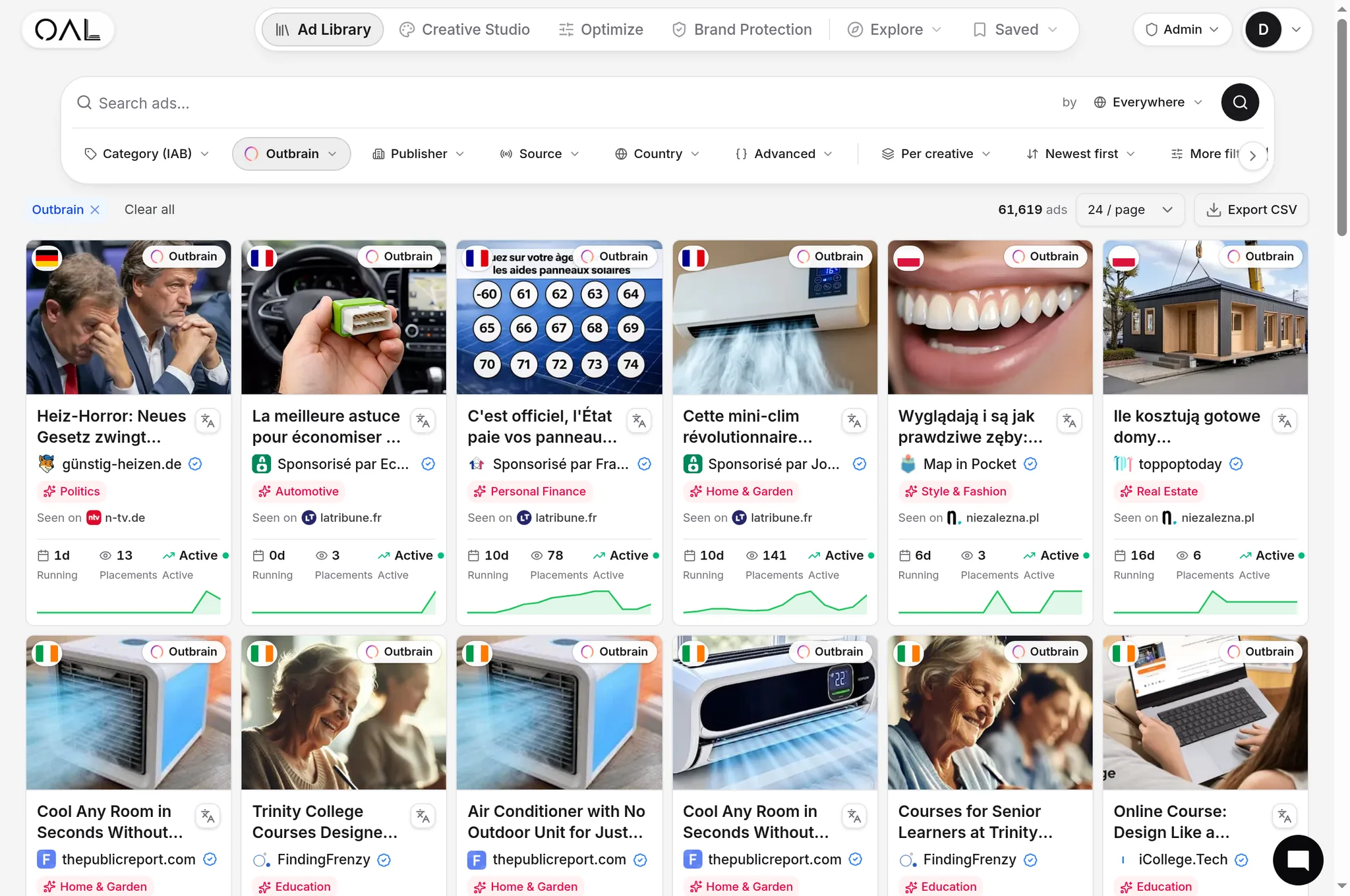
Amplify's own dashboard shows you your own campaigns, not the wider market. Before you commit a budget, it helps to see what advertisers are already running successfully on the network, which sections carry the volume, and how long specific creatives have stayed live (a rough proxy for profitability, since advertisers do not usually keep paying for ads that lose money). OpenAdLibrary's index holds 108,573 live Outbrain creatives as of June 2026, spanning verticals from insurance and finance down to home and garden, each tagged with observed run length, geo signals, and the traced landing page. The /spy/outbrain tool lets you filter that index by advertiser or vertical before you spend your first Amplify dollar, and our Outbrain ad spy guide walks through the research workflow in more depth.
Amplify versus the managed-service option#
If your budget is large enough, Outbrain (now under Teads) will offer a managed-service track instead of pure self-serve: a dedicated rep, custom deal terms, and often bundled access to Teads' outstream video and CTV inventory for a full-funnel pitch. Most independent advertisers never need this. Amplify gives you direct control over targeting, creative, and bidding, and you can scale spend well into five figures a month on the self-serve platform before a managed-service conversation becomes worth having. If you are also weighing Outbrain against search advertising as a channel choice, the self-serve access is one of the clearer advantages: no minimum spend commitment to get started, unlike some managed programmatic deals.
Common mistakes new Amplify advertisers make#
A few patterns show up repeatedly in accounts that struggle out of the gate:
- Launching without a working conversion pixel, which means the automated bidding strategies never get a clean signal to optimize against.
- Uploading a single creative and expecting the algorithm to find winners. Amplify needs multiple headline and image combinations to actually test.
- Ignoring section-level exclusions. Some publisher sections convert far worse than others for a given offer; blocking the weak ones is one of the highest-leverage manual actions available.
- Cutting budget too early. Native campaigns often need a few days of spend before the algorithm has enough data to optimize meaningfully.
Get those four right and Amplify behaves like most other self-serve auction platforms: a tool that rewards good creative and clean data, and punishes accounts that treat it as a set-and-forget budget line.
How Amplify compares to other native self-serve dashboards#
Every major native network runs a similar self-serve structure, campaign, targeting layer, and creative, but the details differ enough to matter if you are running the same offer across several platforms at once. Taboola's dashboard leans harder on automated "Smart Bid" style optimization out of the gate; see our guide to how Taboola ads work for the comparison. MGID and Revcontent, covered in how MGID works and how Revcontent works, generally have lower entry budgets and a less mature automated bidding layer, which suits smaller test budgets before scaling into Amplify's larger publisher pool. If you are running the same creative across multiple native networks, keep a shared naming convention for campaigns and pixels; it makes cross-network performance comparisons far less painful once you are three or four platforms deep.