Español
 Português (Brasil)
 Français
 Deutsch
 Italiano
 Nederlands
 Polski
 Svenska
 Türkçe
 Русский
 日本語
日本語 한국어
한국어 简体中文
简体中文 Tiếng Việt
 Bahasa Indonesia
 繁體中文
繁體中文 Čeština
 Dansk
Dansk Norsk (bokmål)
 Suomi
Suomi Ελληνικά
 Română
 Magyar
 Українська
 ไทย
ไทย हिन्दी
 العربية
 עברית
עבריתGoogle Ads Transparency Center: What It Shows and What It Hides
Google's Transparency Center shows every verified advertiser's ads across Search, YouTube and Display — but no spend, no keywords, no landing pages, and none of the native ads on news sites. Here is how to use it, and where to look when it goes quiet.


The Google Ads Transparency Center is a free public tool at adstransparency.google.com that shows the ads verified advertisers are running across Google Search, YouTube and the Google Display Network. You search by advertiser name or website, filter by region, format and date, and browse the creatives — no account required. Launched in 2023, it answers "what ads does this company run through Google?" quickly and reliably. What it does not answer is almost everything else a marketer wants next: spend, keywords, performance, landing pages — and any ad served outside Google's systems. This guide covers how to use it well, then the limitations that decide what you should and should not conclude from it.
What the Transparency Center is, and where its data comes from#
Google requires advertisers to complete identity verification, and the Transparency Center is the public face of that program: each verified advertiser gets a profile listing their ads, their verified legal name, and the region they verified in. The center exists partly because of political-ads scrutiny and partly because the EU's Digital Services Act obliges very large platforms to run public ad repositories — which is why, as with every transparency surface, the data is deepest where regulation pushes hardest (political ads, the EU) and shallowest everywhere else.
Coverage spans the three Google-served surfaces: Search ads, YouTube ads, and Display ads. If a company runs ads through Google, and they are verified, their ads should be findable here while running — with the retention caveats below.
How to search it properly#
The search box accepts an advertiser name or a website/domain. Domain search is the underrated one: brand names collide and legal names differ from trading names, but a domain maps cleanly to the advertiser profile behind it. From an advertiser's profile you can then:
- Filter by region — essential, because campaigns are geo-split and the default view may not reflect what runs in your market.
- Filter by format — text, image or video, which cleanly separates the Search, Display and YouTube sides of their strategy.
- Filter by date — to see what is running now versus what ran in a window.
- Open individual creatives — each ad has its own detail page showing the creative and where it was shown (Search, YouTube, Display), which you can link to while it remains available.
Three searches worth running on any competitor: their domain (the full ad inventory), their brand name as a text search (are competitors bidding on it? — you'll see rivals' ads in the results for that advertiser name), and their region-by-region footprint (where are they investing?).
What you cannot do is search by keyword or ad copy: the center indexes advertisers, not the words inside ads, and it will not tell you which search queries trigger an ad. Google's help documentation covers the current search surface; it has evolved since launch and will keep doing so.
Political ads get real data; commercial ads get none#
For election and political ads, Google publishes genuinely deep data — spend ranges, impression buckets and targeting information — in its political advertising transparency reporting, largely because law demands it. For ordinary commercial ads there is nothing comparable: no spend, no impressions, no engagement, in any region.
The one meaningful upgrade for commercial ads applies to the EU: under the DSA, ads shown in the European Economic Area carry additional disclosures (such as targeting parameters) and are retained for an extended period — around a year after the ad last ran — whereas outside the EEA the practical window is shorter. Two research consequences follow: EU-market research through the center is materially better than US-market research, and the center is not an archive — an advertiser who pauses everything gradually disappears from it, so capture what matters while it runs.
The six limitations that matter#
- No spend or volume signal. You can see that an advertiser runs ads, not how hard. One creative might carry a seven-figure monthly budget; forty creatives might be a trickle of tests. The center cannot distinguish them.
- No performance signal. Every ad looks equal — there is no CTR, no conversion data, and no reliable way to tell the winner from the abandoned test. Contrast that with longevity-based inference, which is the workhorse of competitor ad research elsewhere.
- No keyword visibility. For Search — Google's core — you cannot see which queries trigger a competitor's ads, which is the single question most PPC buyers bring to the tool. Third-party SEM tools exist precisely because of this gap.
- No landing pages or funnels. The center shows the creative, not where the click goes. Pre-landers, advertorials and offer funnels — the half of the strategy that converts — are invisible. You will need landing-page capture from other sources for that.
- Limited history. Outside the EEA's DSA retention, stopped ads fall away and there is no way to reconstruct last year's creative strategy. Treat the center as a live window, never a record.
- Verified-advertiser scope. The long tail of unverified or evasive advertisers — precisely the ones running the scammy ads transparency is meant to expose — is patchy. Absence from the center is not proof a company doesn't advertise.
What you can and cannot conclude from it#
A quick calibration table, because over-reading transparency data is the most common mistake made with it:
| You observe | Safe conclusion | Unsafe conclusion |
|---|---|---|
| An advertiser has many video ads in one region | They are investing in YouTube there | They are spending heavily or profitably |
| An ad appears across a long date range | The creative persists — likely working | Any specific ROAS or budget figure |
| An advertiser is absent from the center | No verified Google-served ads found | They don't advertise at all |
| Competitors' text ads appear for a brand search | Rivals may be bidding on that brand | Exact keywords or bid strategy |
The pattern: the center supports existence and persistence claims, never magnitude or performance claims.
The gap it will never close: native ads#
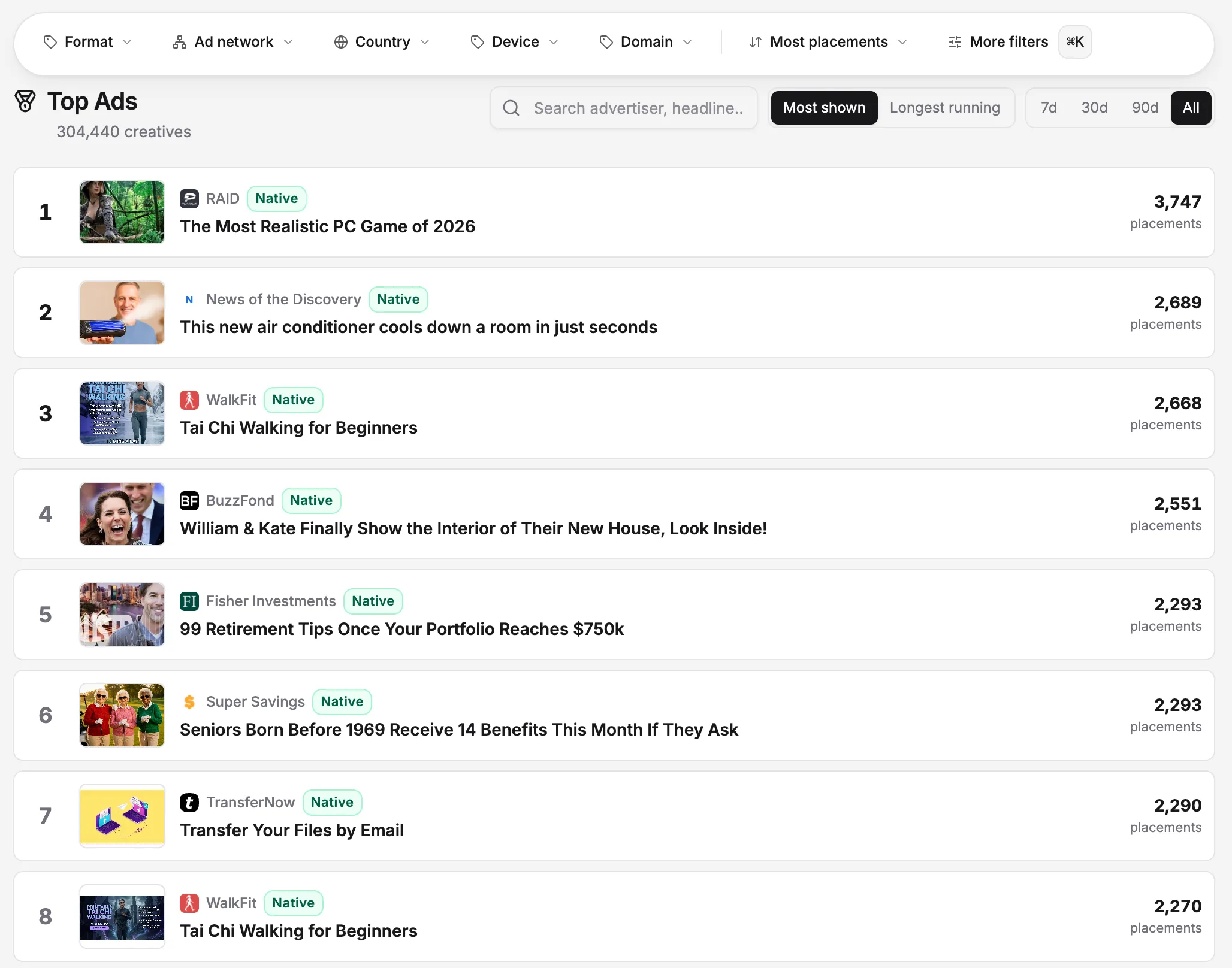
The Transparency Center covers ads Google serves. The sponsored-content tiles under articles on news sites — "recommended for you" widgets with celebrity headlines and miracle products — are almost never Google's: they are served by native networks like Taboola, Outbrain, MGID and Revcontent through content recommendation widgets. None of those networks publishes an official library, so this entire layer of the open web — the layer where affiliate offers, advertorials and the most aggressive direct-response money operates — has no first-party transparency at all. If you have ever tried to look up one of those ads in Google's center and found nothing, identifying which network actually served it explains why.
Independent capture fills that gap. OpenAdLibrary continuously observes and archives the native layer — 725,000+ live creatives from 29,000+ advertisers across 49 networks as of June 2026, each with first/last-seen dates and 1.3 million traced landing pages — effectively the missing ad library for the open web, built the way an independent native ad library has to be: from observation, not disclosure. It is also where the two biggest Transparency Center gaps (longevity signal, landing pages) are first-class data. Browse it free at the native ad spy tool.
A workflow that combines the libraries#
For a full picture of any advertiser, run the stack in this order:
- Google Transparency Center — domain search; map their Search/YouTube/Display presence by region and format.
- Meta Ad Library — the social side; see the Meta Ad Library alternatives rundown for that surface's own quirks and gaps.
- A native index — the open-web side: advertorials, native creatives, and the landing funnels behind them.
- Synthesize by angle, not by channel — the same offer usually runs different creative per channel; the angles that appear on every channel are the proven core of the strategy.
- Put competitors on a watchlist — transparency surfaces reward routine over heroics; a competitor watchlist turns the one-off audit into a feed.
The Transparency Center deserves a place in every marketer's toolkit: it is free, official, and definitive for the narrow question it answers. Just be clear-eyed about the questions it declines to answer — how much, how well, with which keywords, to which page, and anything at all beyond Google's walls.